Getting Started with cURL
curl is a command-line tool used to send and receive data from servers using URLs. Think of it as a way to talk to a server without a browser.
You might be wondering: what is a server, and why do we need to talk to it? Why do we need to talk to it?
A server is just a computer that is always online and ready to answer requests from other computers.
Whenever we open a website, our browser sends a request to a server asking for data, and the server sends the response back. This happens automatically, so we don’t notice it.
Normally, the browser handles all this communication for us.
But sometimes, we want to send requests directly to a server, without using a browser.
That’s when cURL is used — it lets us talk to servers straight from the command line.
What is cURL (in very simple terms)
cURL is a tool that lets you talk to a website or server from the command line.
In very simple terms:
cURL is like a browser without a screen.
You give it a URL, and it:
sends a request to the server
shows you the server’s response as plain text
Example
curl https://google.com
This is like opening Google, but instead of a webpage, you see the raw response.
Why programmers need cURL
Programmers need cURL because it lets them test and talk to servers quickly, directly, and without a browser.
In simple points
Why cURL is useful for programmers
Test APIs easily
Send GET, POST, and PUT requests and see real responses.Debug server problems
Check status codes, headers, and errors clearly.Fast & lightweight
No UI, no setup — just one command.Automation-friendly
Used in scripts, CI/CD, and cron jobs.Understand how the web works
See DNS → HTTP → response in action.Better than guessing
You know exactly what the server returns.
I guess you have confusion bet postman and curl, when to use what, and why
| Feature | cURL | Postman |
| Interface | Command line (Terminal) | Graphical User Interface (GUI) |
| Ease of use | Harder for beginners | Very beginner-friendly |
| Installation | Pre-installed on most systems | Needs separate installation |
| Speed | Very fast & lightweight | Slightly heavier |
| API Testing | Basic testing | Advanced API testing |
| Automation | Excellent (scripts, CI/CD) | Limited (collections, runner) |
| Output format | Raw text (JSON, HTML) | Pretty formatted response |
| Best for | Debugging, scripting, DevOps | Learning, exploring APIs |
| Use in production | Very common | Rare |
| Learning curve | Steep at first | Easy |
Making your first request using cURL
Let’s say you want to talk to a website, but without opening a browser.
That’s exactly what cURL helps us do.
Instead of clicking links, we simply type a command and send a request directly to the server. The server replies, and cURL shows us the response right in the terminal.
Let’s try the simplest possible request.
Your first cURL command
Open Command Prompt / Terminal and type:
curl https://example.com
What’s happening here?
You are sending a GET request to
example.comThe server responds with its webpage
cURL prints that response as text
You’ve just talked to a server — no browser involved
A slightly better example (API-style)
For a cleaner output that looks more “developer-like”, try:
curl https://jsonplaceholder.typicode.com/
This returns:
Server data in JSON
Real API response
Understanding request and response
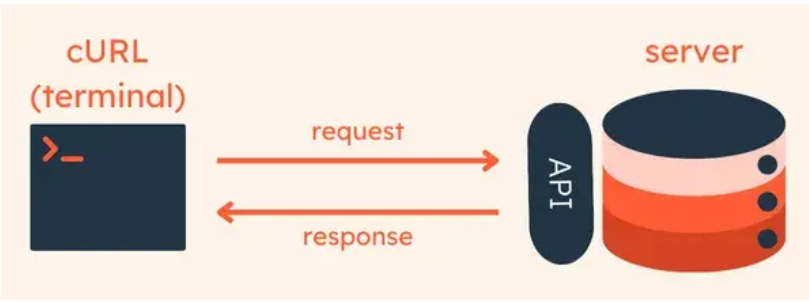
Request Shows (what we send)
The URL (where you’re sending the request)
The method (GET or POST)
Response Shows (what we receive)
Status code (success or failure)
Data (HTML, JSON, text, etc.)
Example response meaning:
200 OK→ request succeeded404→ resource not found500→ server errorThere are more statuscode also according to the response. But these are often used.
GET and POST
GET request (asking for data)
GET is used when you want to fetch something.
curl https://api.google.com/ai_blogs
POST request (sending data)
POST is used when you want to send data to the server.
curl -X POST https://api.google.com/login
Using cURL to talk to APIs
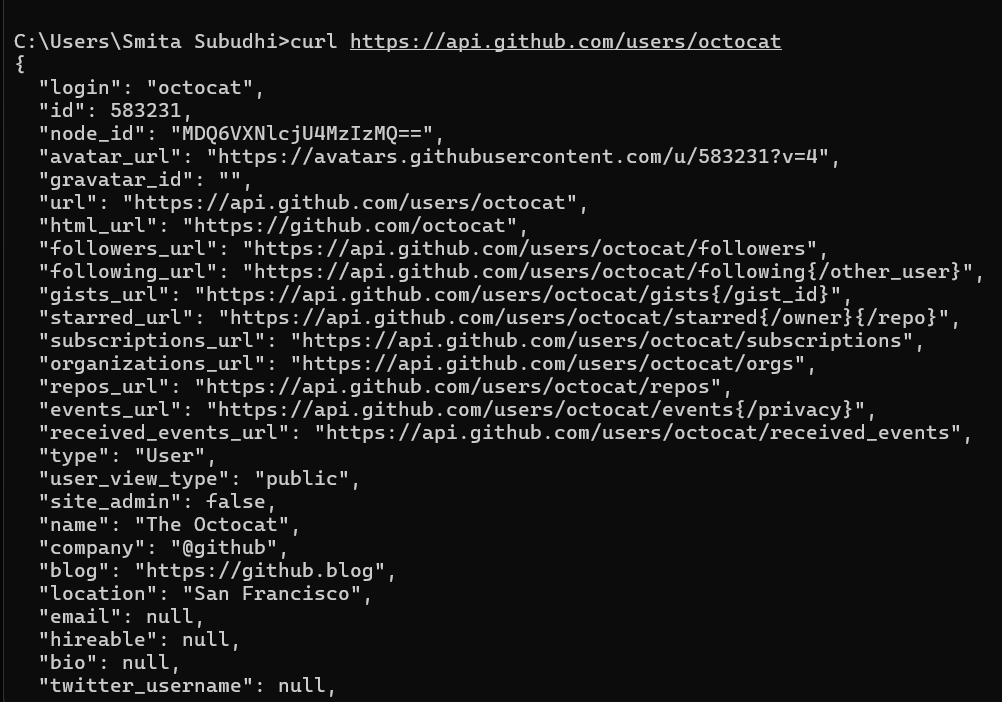
So far, we used cURL to talk to a website. But the real power of cURL shows up when we use it to talk to APIs.An API is just a server that doesn’t return a webpage. Instead, it returns data (usually in JSON format). Using cURL, we can send requests to an API and see exactly what data it sends back — no browser, no UI, just pure communication.
curl https://api.github.com/users/octocat
When we run this kind of command in the terminal, it shows the result like this
Why programmers use cURL for APIs
To test APIs quickly
To debug responses
To understand the request–response flow
To automate API calls in scripts
Common mistakes beginners make with cURL
Beginners often expect cURL to behave like a browser, but it only shows raw server responses.
Many forget that cURL does not follow redirects unless the
-Lflag is used.Another common mistake is not specifying the correct HTTP method or required headers.
Seeing HTML, JSON, or error codes and thinking something is broken is also very common.
In most cases, cURL is working correctly — it’s just showing the real server response.
Conclusion
cURL is a simple but powerful tool to communicate directly with servers and APIs.
It helps us see the real request and response flow without any browser or UI.
Learning cURL gives beginners a clear understanding of how the web works behind the scenes.
It makes API testing, debugging, and automation much easier.
Even though it looks simple, cURL is an essential tool every programmer should know.


